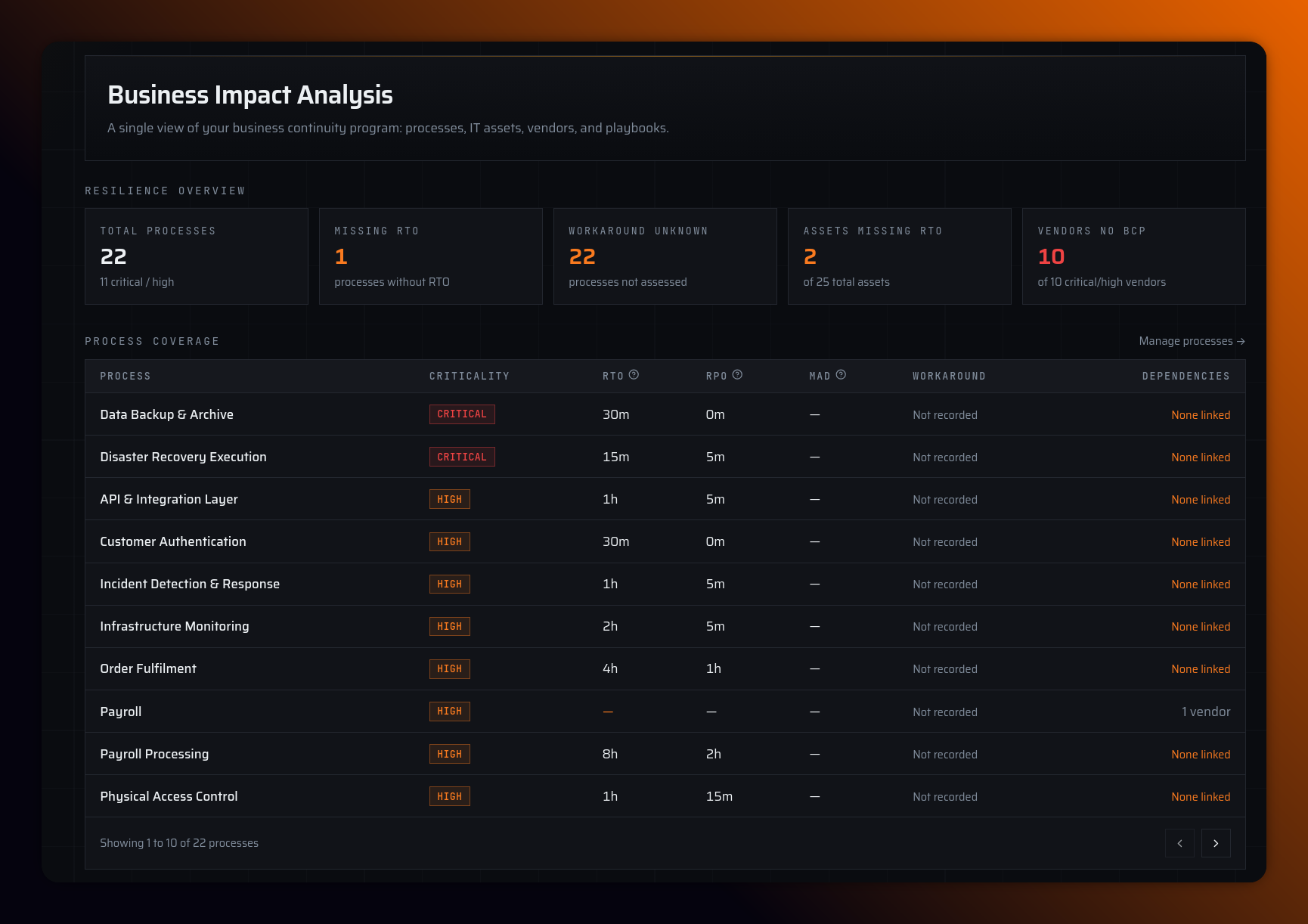
Plus Pro feature. The BC Program section of the sidebar groups the modules that feed scenario Business context and exercise reports. BC Program (/bc-program) opens on the Business Impact Analysis dashboard — a single view of your program across processes, IT assets, vendors, and playbooks.
| Module | Purpose |
|---|---|
| BIA | Resilience dashboard: process coverage, recovery objectives, vendor risk |
| Calendar | Due dates, lessons learned, planned events, and completed tabletop history |
| IT Assets | Systems and applications with criticality, RTO/RPO |
| Vendors | Third-party dependencies |
| Business Processes | Critical processes with recovery objectives and dependencies |
| Playbooks | PDF runbooks participants view during exercises |
The record modules (IT Assets, Vendors, Business Processes) each have a Fields tab Plus Pro to customize types, categories, and shared tags org-wide.
Limits (Plus): 50 assets, 50 vendors, 50 business processes, 5 playbooks
Limits (Pro): Unlimited assets/vendors/processes, 20 playbooks
Link assets/vendors/processes to scenario phases in the scenario editor Business context tab. On Starter, BC Program pages show an upgrade banner.